wellNetMind
wellNetMind sits on an optional reception Mac Mini. wellNet on the clinic phones remains the diary of record and works without this Mac. Client data is only ever stored on the practice device unless you send a copy here with Backup to Hub. wellNetMind is the catalogue for extra services: preview the public page, keep practice bills and accounts on this Mac, and (being added) the Stripe pre-payment queue.
01
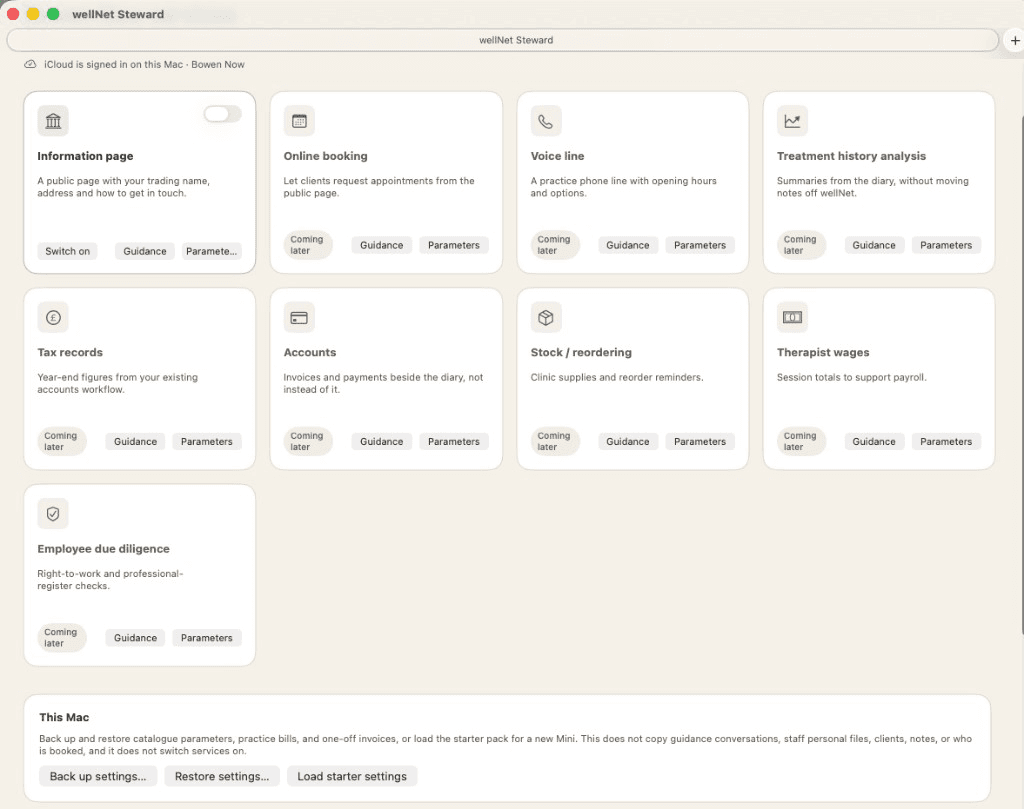
Catalogue on reception
Each service is a tile. Switch on what you use on this Mac. Coming-later tiles stay visible so you can prepare them without turning them live. Switching the information page off does not unpublish the public website.
02
Information page preview
Visitors see the noticeboard the practice has already published from wellNet on the phones. wellNetMind shows a preview, a link you can copy, and a local page on this Mac. You can try a generated look on that local page, then save and upload it. wellNetMind does not edit or unpublish the live card.
03
Practice hub
Off until you turn it on. Then the practice phone can Backup to Hub on clinic Wi-Fi. This Mac holds a copy of the diary for Today, accounts, and reminders if the mailbox is set. The hub stays on clinic Wi-Fi. It is not opened on the public internet.
04
Guidance on every service
Each tile has its own conversation: wording for the public page, hours and holidays for later booking, a voice-line greeting, year end, stock, wages, or due diligence. Using Guidance does not switch the service on. Personal files (wages, due diligence) stay with the person you choose first.
05
Practice bills and one-off invoices
Record rent, utilities, insurance, and similar on this Mac. Record a one-off invoice to an external company (an event, hire, or training). These are not wellNet client sales. Mark an invoice paid when the money has come in.
06
Accounts reports
Ask for a practice report, VAT on till sales, accounts payable, accounts receivable, or a cash-flow look-ahead of at most two months. Save CSV or PDF. Client names are not listed. Phone Reports remain the till figures on wellNet.
07
Settings on this Mac
Parameters hold standing notes (currency, year end, closed days). Back up catalogue settings, staff first names, bills, and invoices. The file does not contain clients, notes, who is booked, or guidance conversations. Restore does not switch services on.
08
Stripe pre-payment (being added)
Online pre-payment is being added to wellNet. It requires wellNetMind. Visitors pay on Stripe’s page. wellNet keeps the payment reference and remains the book of record. This Mac shows the Stripe queue after a refresh from wellNet. Complete, reverse, or retain sends a note to the phone; a person on wellNet updates the visit by hand. Card numbers never enter wellNet or wellNetMind.
09
What stays private
The public page and any later outward booking may see location and therapist availability, and treatment name, duration, and price. Visitors can ask for more than one combinable treatment in one request. Occupied time is an opaque busy block. Client names, notes, and who holds a slot never go out. wellNet writes the diary.