wellNet
wellNet is the diary of record for a licensed practice. Staff book, take payment, and keep notes on the clinic phones. Client data is only ever stored on the practice device. L5 does not keep a copy of the client file. The phones work without a reception Mac. It is not a generic booking website.
How it helps the business
- Clearer diary and client records in one place.
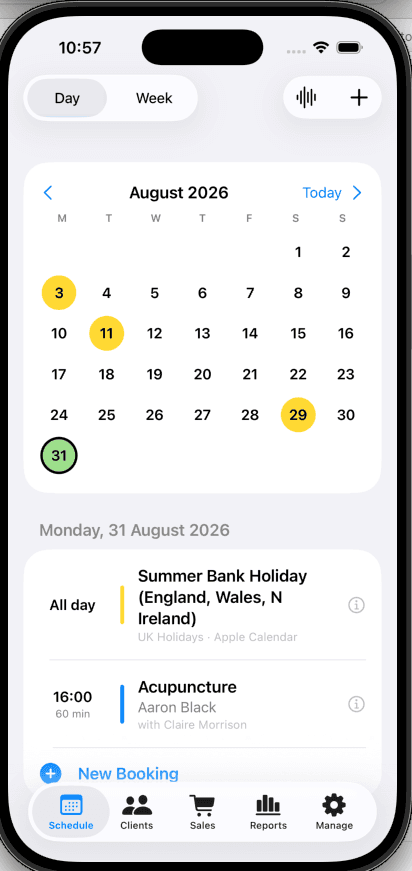
- A bookings calendar where the user can optionally see their personal calendar events merged in.
- Easier booking and handover between therapists.
- Sales and simple reporting without paper or scattered tools.
- Built for small practices that work on Apple devices.
- Managing associate therapists as a team.
- Support for optional VAT on bill payments, and generation of electronic receipts.
- Creation of reminder texts for pasting into SMS, email, and WhatsApp.
- Backup and restore to a file on the practice device in a single click.
- Client data is only ever stored on the practice device. There is no third-party SaaS diary. That protects a small clinic better than a typical hosted book.
- No monthly subscription.
- Low-cost perpetual licence.
- Regular upgrades possible.
- A growth path with wellNetMind. An optional reception Mac Mini. The phones work without it. Accounts, Backup to Hub, the public page preview, and Stripe pre-payment (being added) live there.
01
Who holds the records
A typical clinic SaaS keeps your diary on the vendor’s computers. They can read it, lose it, raise the rent, or switch the product off. The practice is a tenant. wellNet is the opposite. Client names, notes, pictures, and who is booked are stored only on the practice device. L5 writes the app. L5 does not keep a copy of the client file and does not have a key to the private diary. If you stop using wellNet, a backup file on that phone remains yours. The only things that leave that device on purpose are what you publish for the public page (practice text, not the client record) and, if you turn the optional hub on, a copy you send to the reception Mac with Backup to Hub.
02
Shared schedule
Day, week, and month views. Book a client into one or more treatments, a room, and a therapist. Treatments that may be combined share one diary block; a treatment marked for its own booking stays a separate visit. Hours repeat each week. The same therapist or the same room cannot double-book. Notes on a booking are stamped with the time and who wrote them.
03
Clients
Search by name, phone, or email. Each record holds contact details, notes, booking history, and purchases. You can start a booking from the client so their name is already filled. A picture on a note stays on the practice device. L5 does not host it.
04
Till and receipts
Take payment on a booking or from the Sales tab: treatments, stock, or a custom line. A combined visit writes one sale line per treatment. Amounts are before VAT; if a rate is set, the form shows VAT and the total. Receipts copy, share, or open in Mail. Stock falls when you sell inventory.
05
Reports
Week, month, or year: takings, sale count, booked time, and charts. Staff see their own figures. An administrator sees the whole practice. Save PDF or CSV. Those phone reports are different from accounts reports on the reception Mac.
06
Voice on the diary
From the schedule, speak or type a booking. The assistant writes into the same diary and will not book outside marked hours.
07
Practice phones and staff logins
Each person keeps their own Apple ID for Photos and Messages. The wellNet login chooses which therapist you are. One phone is the practice phone and holds the full diary. Other phones are staff phones for the working day: Start of Day brings that therapist’s bookings from the practice phone on clinic Wi-Fi; End of Day sends notes, pictures, and payments back. See staff organisation.
08
Practice setup
Administrators maintain company details, staff, treatments (including whether a treatment may be combined), stock, rooms, and backup. They publish the public information page (trading name, address, how to get in touch) from Manage. A web request is not a diary booking until someone writes it in — so spam does not land on the day list. Clients, notes, and who is booked do not go on that page.
09
Public page and online requests
Visitors can read the practice information page and, when you offer it, ask for a time on the book page. Occupied time is shown as taken, never who is coming in. Reception writes an accepted request into the diary on the practice phone.
10
Backup to Hub
Optional. With wellNetMind listening on clinic Wi-Fi, Backup to Hub sends a copy of the diary to the reception Mac for accounts and the day board. The practice phone remains the book of record.
11
Stripe pre-payment (being added)
Online pre-payment is being added to wellNet. Visitors will pay on Stripe’s page; card numbers stay with Stripe. wellNet stores the payment reference on the visit. This requires wellNetMind on the reception Mac for the payment queue and controls. A person on wellNet still applies the amount to the booking by hand.